

A home workspace should make it easier to concentrate, organize tasks, and complete everyday responsibilities. However, a crowded desk, poorly arranged equipment, or insufficient storage can make working from home feel more difficult than necessary.
You do not need a separate office room to create a functional workspace. A dedicated corner, a compact desk, and a few practical organizing solutions can help you establish an area that supports your routine.
By planning your layout, reducing distractions, and keeping essential supplies accessible, you can create a workspace that feels more organized and comfortable.
Choose a Suitable Location
Start by identifying a location that fits your work requirements and available space. If possible, choose an area with enough room for your equipment and a comfortable chair, while allowing you to move freely.
Consider noise, lighting, electrical outlets, and the amount of privacy you need. A quiet corner may work well for focused tasks, while a shared living area may require additional organization at the end of each workday.
If your workspace is part of another room, use a shelf, small cabinet, or desk arrangement to help define the area. Keeping work materials in one place can make it easier to separate professional tasks from household activities.
Choose a location that you can maintain consistently rather than one that requires frequent rearrangement.
Keep Your Desk Clear and Functional
A crowded desk can make it harder to find supplies and focus on the task in front of you. Keep only the items you use regularly on the work surface, such as your computer, notebook, writing tools, and other essential equipment.
Move paperwork, spare cables, and occasional-use accessories into suitable storage. Drawer organizers and small containers can help keep supplies separated without taking up too much room.
Arrange frequently used items within comfortable reach, but leave enough open space for writing, reviewing documents, or completing other tasks.
At the end of each work session, return items to their designated places. A brief reset can help you begin the next day with a cleaner and more organized desk.
Arrange Equipment for Comfortable Use
Your workspace should support the way you work. Position your monitor or laptop so you can view the screen comfortably, and consider an external keyboard or mouse if they would improve your setup.
If your work involves multiple applications or documents, an additional monitor may help you view information side by side. Before adding equipment, check that your desk has sufficient space and that the setup remains comfortable.
Keep chargers and accessories close enough to use conveniently without allowing cables to spread across the work surface. Secure cords appropriately and avoid placing them where they may cause tripping or interfere with movement.
Choose equipment based on your actual work requirements rather than adding devices that create unnecessary complexity.
Use Vertical Storage to Save Space
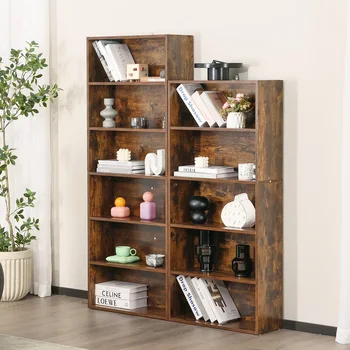
When desk space is limited, wall-mounted storage and shelves can help keep supplies organized. Use suitable shelves for books, notebooks, reference materials, and decorative items that do not need to remain on the desk.
A wall organizer or pegboard can provide a convenient place for small supplies, provided it is installed securely and arranged according to your needs.
A magnetic whiteboard or suitable planning surface can help you keep reminders and short task lists visible. Avoid displaying so much information that the area becomes distracting.
Make sure storage is easy to access and does not interfere with your monitor, lighting, or normal movement around the workspace.
Improve Lighting and Comfort
Good lighting can make everyday work more comfortable. Where possible, position your desk to benefit from natural light without creating distracting screen glare.
Add a suitable desk lamp if you need extra illumination for reading, writing, or working during darker hours. Position lighting so it helps you see clearly without shining directly into your eyes or reflecting excessively on your screen.
Choose a chair and desk arrangement that allow you to work in a comfortable posture. Adjust your equipment to suit your body and take regular breaks to move around, particularly during long periods of sitting.
Comfort and organization should work together. A tidy workspace is more useful when it also supports your physical needs.
Establish a Simple Workday Routine
A consistent routine can help maintain an organized home office. Begin the day by reviewing priorities and preparing the materials you need. Keep notes and documents in designated places so you can find them later.
At the end of the day, close unnecessary applications, put away loose supplies, and prepare your workspace for the next session. If your office shares space with another household activity, store work items in a dedicated container when you finish.
Review your setup periodically. If a particular area repeatedly becomes cluttered, consider whether the storage arrangement needs to change.
Create a Workspace That Works for You
An effective home workspace does not depend on having a large office or expensive equipment. A suitable location, organized desk, accessible storage, comfortable lighting, and consistent routines can make working from home easier.
Start with the changes that address your biggest challenges. Over time, small improvements can help you create a workspace that supports focus and everyday productivity.





0 Comments